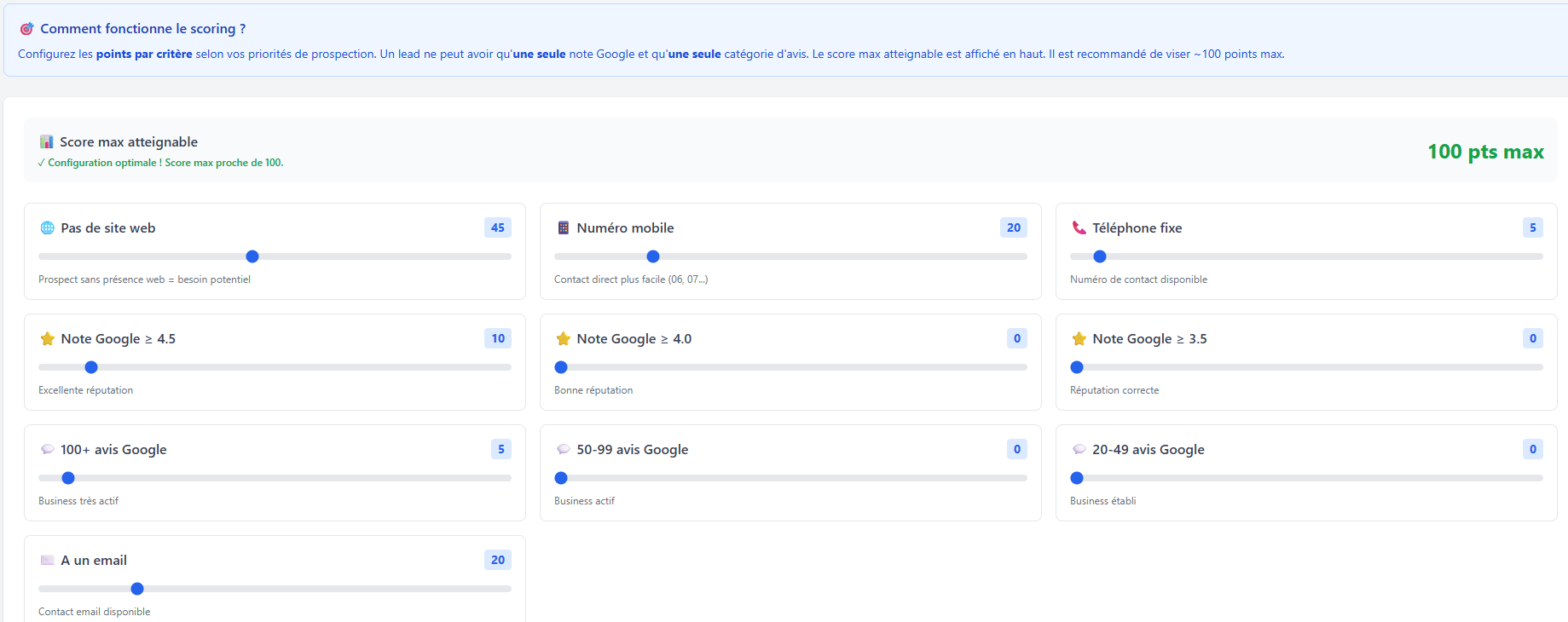
Each lead automatically receives a priority score based on 10 customizable criteria. Identify the most promising prospects at a glance and focus your energy where it counts.
Each criterion has a weighting slider to adjust the number of points awarded. Here is the default configuration:
Maximum achievable score
100 pts
A simple and transparent system to prioritize your prospects effortlessly.
Each criterion has a slider from 0 to 100 points. Move it to increase or decrease the importance of each factor according to your strategy.
As soon as a lead is imported or updated, its score is automatically recalculated. No manual action needed.
The score appears in the Kanban pipeline, the lead list and the detailed card. Sort and filter your prospects by score in one click.
A lead gets one Google rating tier (the highest reached) and one review tier. Points don't stack within the same category. Recommended max score: ~100 points.
Each criterion is chosen to identify the most accessible prospects and those most likely to become clients.
If you're a web agency, a business without a website is your ideal prospect. They have a concrete and measurable need. That's why this criterion carries the highest weight (45 pts by default).
A mobile phone number means you can reach the decision-maker directly. No switchboard, no secretary. The response rate is significantly higher.
A high Google rating (≥ 4.5) indicates a well-functioning business with satisfied customers. This type of company can afford to invest in its services and visibility.
A business with 100+ Google reviews is a sign of intense activity and regular customer flow. It's a prospect with volume that can benefit from your services.
Having an email address allows sending detailed commercial proposals, portfolios, quotes. It's a less intrusive channel than phone and ideal for a first contact.
Each user can configure their own weightings. Here are examples of optimal configurations by sector.
Target businesses with no online presence. Boost the "no website" criterion to the maximum.
Prioritize businesses with an email and many reviews. They're active and need visibility.
Bet on direct contacts and well-rated businesses. Mobile and Google rating are your best indicators.
Create your free account and customize your scoring criteria in a few clicks. Immediately identify your best prospects.
No credit card • No commitment • 300 free leads