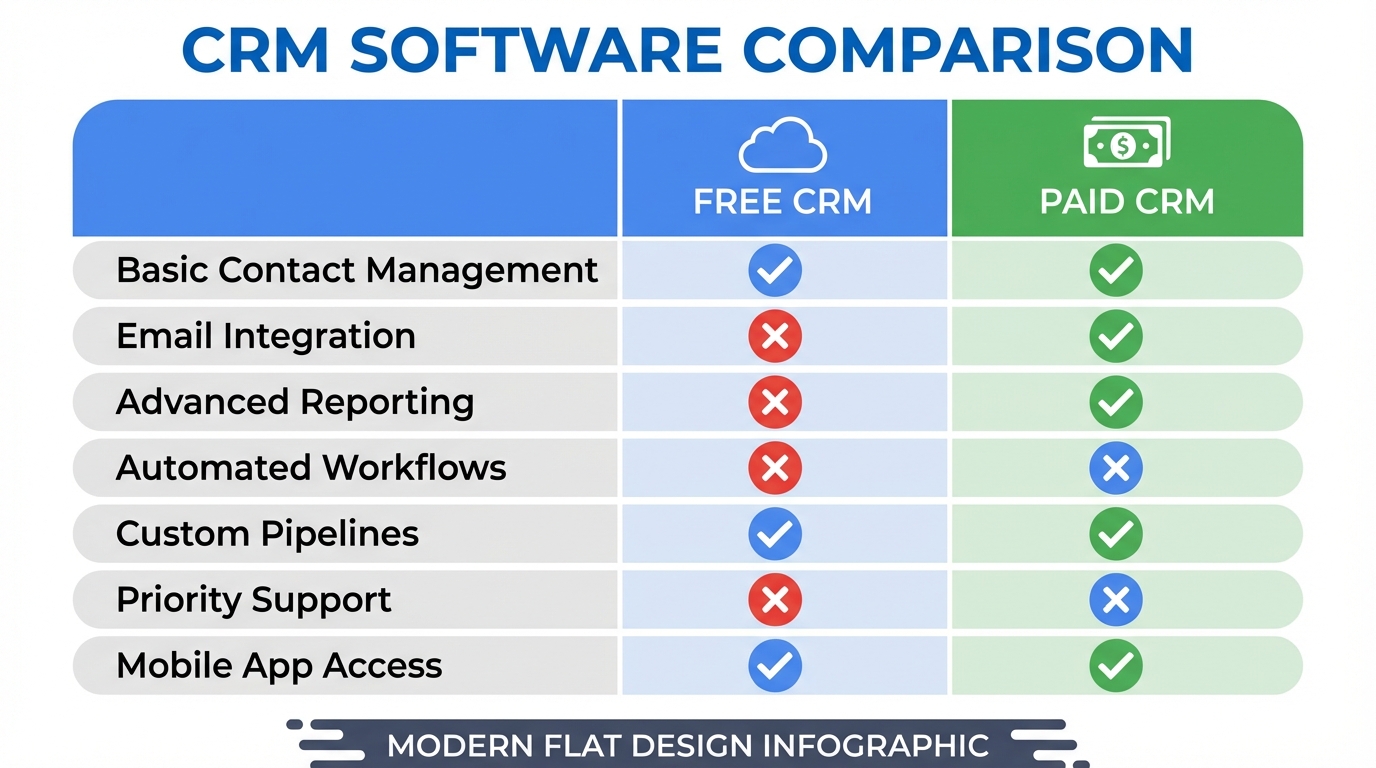
The CRM dilemma: free or paid?
You’re a freelancer, tradesperson, or small business owner. You know you need a prospecting CRM to organize your contacts and stop losing opportunities. But facing the overwhelming market, one question keeps coming back: should you invest in a paid CRM or start with a free solution?
This isn’t a trivial question. The wrong choice can be costly:
- A free CRM that’s too limited will waste your time on workarounds
- An oversized paid CRM will drain your budget with no return on investment
73% of small businesses abandon their CRM within the first 6 months, mainly because it didn’t match their actual needs.
In this guide, we’ll objectively compare free CRMs and paid CRMs in 2026. Pros, cons, hidden limitations, and most importantly: which profile matches which solution. By the end, you’ll know exactly which type of CRM to choose for your business.
Free CRMs: what they really offer
Free CRMs have evolved significantly in recent years. Some offer features that rival paid solutions. But it’s crucial to understand what “free” really means.
Advantages of free CRMs
Zero cost to get started
It’s obvious, but it’s also the decisive argument for many. When you’re launching your business or your budget is tight, every dollar counts. A free CRM lets you:
- Test the lead management concept with no financial risk
- Professionalize your prospecting with no upfront investment
- Validate that the tool matches how you work
Quick setup and simplicity
Free CRMs generally focus on simplicity. No 3-day training, no consultant to pay for setup. You create an account, import your contacts, and start working.
This accessibility isn’t a flaw: for a solo freelancer or micro-business, a simple tool you actually use beats a powerful tool you abandon.
Essential features included
A good free CRM in 2026 typically offers:
- Contact management and prospect records
- Visual prospecting pipeline
- Data import/export (CSV)
- Notes and interaction history
- Basic reminders and tasks
That’s more than enough for 80% of independents and small teams.
Typical limitations of free CRMs
Limited number of leads or contacts
This is the most common restriction. Vendors offer a free version with a ceiling:
- HubSpot CRM: free but limited marketing features
- Freshsales: 100 contacts in the free version
- Zoho CRM: 3 users maximum
Once the limit is reached, you must upgrade to the paid version or look for an alternative.
Advanced features locked away
Free CRMs often reserve their best features for premium versions:
- Automations and workflows
- Advanced reports and custom dashboards
- Integrations with other tools
- Priority customer support
You may find yourself limited just when your business takes off and you need these features most.
Ads or imposed branding
Some free CRMs display their logo on your emails or documents sent to prospects. Others embed ads in the interface. This isn’t always a problem, but worth considering if your professional image matters.
Paid CRMs: who are they really for?
Paid CRMs are an investment. Before pulling out your credit card, let’s make sure you actually need this level of service.
Advantages of paid CRMs
Advanced and complete features
A paid CRM gives you access to the full arsenal:
- Automation: email sequences, workflows, triggered actions
- Advanced scoring: algorithms to identify your best leads
- Native integrations: connection with your messaging, calendar, marketing tools
- Custom reports: advanced analytics, sales forecasts
These features can transform your productivity… if you actually use them.
Customer support and guidance
With a paid subscription, you generally get responsive support:
- Live chat or phone
- Guaranteed response time
- Sometimes a dedicated account manager
When your CRM is at the heart of your sales activity, this support can be worth its weight in gold when problems arise.
Guaranteed scalability
Paid CRMs are designed to grow with you. More users, more leads, more features: you can scale without switching tools.
Disadvantages of paid CRMs
Recurring monthly cost
Pricing varies enormously:
| CRM | Entry price | Team price |
|---|---|---|
| HubSpot Sales Hub | $45/month/user | $450/month (5 users) |
| Pipedrive | $14/month/user | $250/month (5 users) |
| Salesforce | $25/month/user | $625/month (5 users) |
| Monday Sales | $12/month/user | $180/month (5 users) |
Over a year, even a “small” subscription represents several hundred dollars. Are you certain you’ll get a return on that investment?
Complexity and learning curve
The more powerful a CRM, the more time it takes to master. Sales teams often underuse their paid CRM, leveraging barely 20% of available features.
Lock-in and dependency
Some vendors require annual commitments. And once your data, workflows, and habits are established in a CRM, migrating to another tool becomes costly in time and energy.
Comparison table: 5 popular CRMs in 2026
Here’s an objective comparison of the main solutions on the market, including their free and paid offerings:
| CRM | Free version | Lead limit | Premium price | Strength | Weakness |
|---|---|---|---|---|---|
| HubSpot CRM | Yes | Unlimited | $45/month/user | Marketing ecosystem | Complex, expensive at advanced tiers |
| Pipedrive | No (14-day trial) | - | $14/month/user | Intuitive interface | No free version |
| Zoho CRM | Yes | 3 users max | $14/month/user | Complete and affordable | Dated interface |
| Freshsales | Yes | 100 contacts | $15/month/user | Built-in AI | Strict contact limit |
| Prospect Hub | Yes | 300 leads | Scalable plans | Unlimited import, AI, simplicity | Newer ecosystem |
What this table reveals
- HubSpot is the best known but quickly becomes expensive for marketing features
- Pipedrive is excellent but has no true free version
- Zoho offers good value but suffers from an aging interface
- Freshsales has a very restrictive contact limit in the free tier
- Prospect Hub positions itself on simplicity with a generous free offering
Selection criteria by profile
Rather than choosing the “best” CRM (which doesn’t exist), let’s identify the one that matches your situation.
Profile 1: Solo freelancer
Your characteristics:
- You work alone
- 20 to 100 active prospects to manage
- Tight or nonexistent tool budget
- Need simplicity, not complex features
Our recommendation: Simple free CRM
You don’t need a Salesforce. A free CRM with a good visual pipeline and the ability to add notes is more than enough. Focus on daily use rather than features.
Suitable solutions:
- Prospect Hub (300 free leads, clean interface)
- Notion or Trello (if you prefer DIY)
- HubSpot CRM (if you plan to scale quickly)
Profile 2: Small team (2-5 people)
Your characteristics:
- Team of 2 to 5 salespeople or partners
- Several hundred prospects to track
- Need to share information between collaborators
- Limited but existing budget
Our recommendation: Free CRM with paid options
Start with a multi-user free version. Upgrade to paid only when you hit a blocking limitation (lead count, critical missing feature).
Suitable solutions:
- Zoho CRM Free (3 users included)
- HubSpot CRM (free, pay for advanced features)
- Prospect Hub (if you stay under 300 active leads)
Profile 3: Structured sales team
Your characteristics:
- Team of 5+ salespeople
- Defined sales process with multiple stages
- Need for reporting and forecasting
- Dedicated budget for sales tools
Our recommendation: Suitable paid CRM
With a structured team, investing in a paid CRM is justified. The time saved and visibility into sales activity more than compensate for the subscription cost.
Suitable solutions:
- Pipedrive (excellent features-to-price ratio)
- HubSpot Sales Hub (if you already use HubSpot Marketing)
- Salesforce (if you have very specific needs)
Profile 4: Local tradesperson or shop owner
Your characteristics:
- Local business with a neighborhood clientele
- Occasional prospecting (trade shows, referrals)
- No particular technical skills
- Near-zero software budget
Our recommendation: Minimalist free CRM
You need an enhanced address book, not a sales enablement tool. Prioritize absolute simplicity and instant setup.
Suitable solutions:
- Prospect Hub (designed for independents and tradespeople)
- A simple Google Sheets spreadsheet (if truly basic)
Focus: Prospect Hub, the CRM built for independents
At Prospect Hub, we designed our sales prospecting tool based on a simple observation: most freelancers and small businesses don’t need a complex CRM. They need a tool they’ll actually use.
What you get for free
300 leads included
Unlike other CRMs that limit to 100 contacts, Prospect Hub gives you 300 leads in the free version. For a freelancer or micro-business, that’s typically enough for several months of active prospecting.
Unlimited CSV import
Free CSV import is at the core of our tool. Collected prospects from Google Maps, LinkedIn, or elsewhere? Import them in a few clicks, with no file or frequency limits. Smart mapping automatically detects your columns.
Full visual pipeline
No “light” version of the pipeline on the free plan. You get access to all columns, drag and drop, and filters. Visualize your prospecting at a glance and never lose a hot lead again.
Automatic scoring
Every imported lead receives a score based on multiple criteria: website presence, Google rating, number of reviews. You instantly know who to contact first in your lead management.
When to upgrade to paid?
Our paid plans scale with your volume and needs, from Pro (1,000 leads) to Business (3,000 leads), Scale (10,000 leads) and Enterprise (50,000 leads). Going paid is justified when:
- You regularly exceed the 300 active leads of the free plan
- You want to unlock AI lead analysis and the AI qualification chatbot
- You need more users, advanced reminders or priority support
The detailed pricing of each plan is on our pricing page.
But our philosophy is clear: stay on free as long as it works for you. We prefer active, satisfied users over frustrated subscribers.
Discover our full pricing and detailed features to make your choice.
How to migrate from a free CRM to a paid one?
If you start with a free CRM and your business takes off, migration to a more powerful solution is inevitable. Here’s how to prepare.
Signs it’s time to switch
- You regularly hit the limits (leads, users)
- You spend time on repetitive tasks that could be automated
- You need reports your current CRM can’t generate
- Your team is growing and collaboration is getting complicated
Pre-migration checklist
- Export all your data (most CRMs allow CSV export)
- Document your current processes (pipeline stages, statuses used)
- List your unmet needs (what you truly lack)
- Test 2-3 alternatives before committing
- Plan a transition period (1-2 weeks minimum)
Avoid over-migrating
A common mistake: jumping from a simple free CRM to an ultra-complex paid CRM “to be set for good”. Result: you underuse the tool and regret the investment.
Move up one notch at a time. If you were on a basic free CRM, switch to a mid-range paid CRM, not directly to Salesforce Enterprise.
Conclusion: start free, migrate if needed
The choice between free CRM and paid CRM isn’t a question of quality. It’s a question of fit with your current needs.
Our recommendation:
- Always start with a free CRM — test the concept with no financial risk
- Actually use it for 2-3 months — an abandoned CRM is useless whether free or paid
- Identify your real pain points — not features that “could be useful,” but ones you truly lack
- Upgrade to paid only when justified — when the subscription cost is less than the time lost without advanced features
The best CRM isn’t the most powerful or the cheapest. It’s the one you use every day.
Ready to start with a free CRM that respects these principles? Create your Prospect Hub account and import your first 300 leads for free. If your business explodes and you need more, we’ll be there. In the meantime, enjoy a simple tool that gets the job done.
Key takeaways:
- Free CRMs in 2026 offer sufficient features for 80% of independents and small teams
- Paid CRMs are justified for structured teams with automation and advanced reporting needs
- Choose based on your actual profile, not your future ambitions
- Prospect Hub offers 300 free leads and unlimited CSV import — ideal for starting your lead management with confidence
- Migration from free to paid is always possible — start simple, evolve if needed