Your form is an open door. What lock will you choose?
Every contact form is an invitation. For your prospects, it’s a communication channel. For bots, it’s a target. The question is no longer whether you’ll receive spam, but how much you’re willing to absorb — and at what cost.
42% of B2B form submissions come from bots or malicious actors. For a sales team processing 200 leads per month, that’s 84 fictitious contacts to sort, qualify, and eliminate.
The market today offers five major families of anti-bot solutions. Each has its strengths, blind spots, and true cost — not just in dollars, but in user experience, regulatory compliance, and operational burden for your teams.
Here’s a comprehensive overview to help you choose.
The 5 anti-bot solutions examined
1. The honeypot: the invisible trap
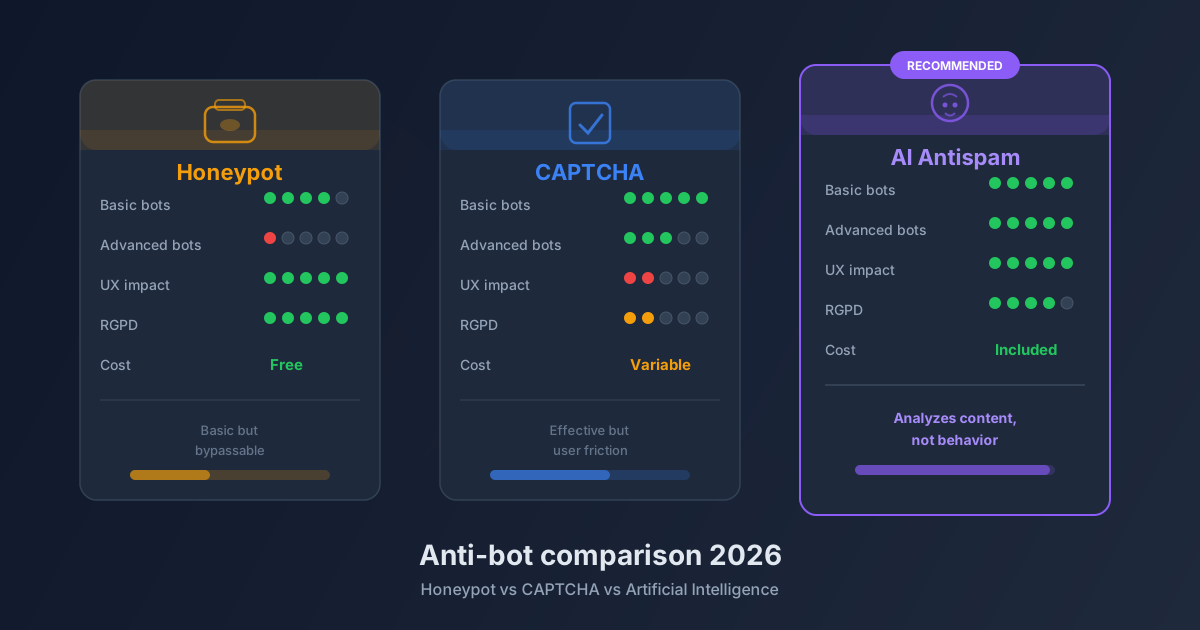
The principle is elegantly simple. An extra field is added to your form, but made invisible on screen via CSS. A human doesn’t see it and doesn’t fill it. A bot, which scans the HTML line by line, mechanically fills every input it finds, including those hidden by CSS. Result: any submission with this field filled is automatically rejected.
What the honeypot does well:
- Zero friction for the user. Absolutely none.
- Free to implement. No external dependency.
- No data transmitted to a third party.
- Effective against the overwhelming majority of low-tier bots that flood forms en masse.
Its limitations:
Sophisticated 2026 bots can identify honeypot fields. They analyze CSS attributes, suspicious field names (website, url, phone2), and deliberately ignore them. Against a targeted attacker or a manual submission service, the honeypot alone isn’t enough.
The honeypot is an essential first line of defense, not a fortress. It must be combined with other layers.
2. reCAPTCHA v2 (Google): the standard turned cumbersome
“I’m not a robot.” This checkbox has been clicked billions of times since 2014. Google’s reCAPTCHA v2 became the default standard, often integrated out of habit.
What it does well:
- Recognized and understood by all users.
- Effective against classic automated bots.
- Documented integration across all platforms.
Its limitations — and they’re significant:
User experience is degraded. Image grids (“select all traffic lights”) are time-consuming, frustrating, and particularly penalizing on mobile. Every second of added friction reduces your conversion rate.
On accessibility, reCAPTCHA poses documented problems for visually impaired users or those with cognitive disorders. This is a growing regulatory risk in Europe.
Finally, the GDPR question is central. Google collects behavioral data on your visitors when reCAPTCHA activates. This data feeds Google’s advertising systems. Technically, this involves data transfer to American servers, requiring explicit mention in your privacy policy and, by some interpretations, prior consent.
3. reCAPTCHA v3 (Google): invisible but opaque
Google responded to UX criticism with reCAPTCHA v3. This version works in the background: it assigns a confidence score (0 to 1) to each visitor by analyzing their browsing behavior. No user interaction required.
What it does well:
- Apparently preserved user experience.
- Finer behavioral detection than v2.
Its limitations: The system is a total black box. You don’t know exactly why a score of 0.3 is assigned instead of 0.7, or which signals were considered. False positives are real: legitimate users on VPN connections, private browsing mode, or atypical configurations can be penalized.
The GDPR problem remains — arguably amplified: the script continuously collects data on all pages where it’s loaded, not just the form page.
4. hCaptcha and Cloudflare Turnstile: the respectful alternatives
Facing Google’s limitations, two alternatives have emerged in recent years.
hCaptcha adopts a model similar to reCAPTCHA v2 (visual challenges) but with a different data policy: data isn’t resold for advertising purposes. hCaptcha is even revenue-generating for sites that integrate it, as challenges contribute to data annotation projects for client companies.
Cloudflare Turnstile is today the most compelling solution in the segment. It works entirely invisibly for the user in the vast majority of cases. Analysis happens client-side in milliseconds, with no visual challenges. Data remains on Cloudflare’s infrastructure, with a significantly stricter privacy policy than Google’s. Integration is fast, the API well-documented, and the service is free up to 1 million requests per month.
Common limitation: these solutions remain behavioral systems. They analyze how the user interacts with the page, not what they write. A human operator paid to fill forms bypasses them effortlessly.
5. AI (content analysis): the next generation
Previous approaches share a common trait: they try to distinguish a human from a bot by navigation behavior. AI approaches the problem from the other direction: it analyzes the message content itself.
A language model trained on thousands of spam examples can detect:
- Linguistic patterns characteristic of spam (“I found your website and would like to offer…”)
- Semantic inconsistencies between the stated subject and the actual message
- Signals of disguised commercial intent
- Recycled templates, even slightly reformulated
- The personalization level of the message (a real prospect typically mentions your name, your business, a specific context)
Next-generation bots perfectly simulate human behavior on a web page. They move the mouse, pause, fill fields slowly. Only the content betrays them.
AI analysis is the only approach that remains effective against these sophisticated actors. It operates after submission, transparently for the user, and produces a confidence score usable by your CRM.
Its main drawback is infrastructure cost: it requires an API call per form submission, which implies latency and variable cost depending on volume.
Complete comparison table
| Solution | Basic bot effectiveness | Advanced bot effectiveness | UX impact | Privacy / GDPR | Cost | Integration ease |
|---|---|---|---|---|---|---|
| Honeypot | Excellent | Low | None (invisible) | Perfect (0 external data) | Free | Very simple |
| reCAPTCHA v2 | Excellent | Good | High friction | Problematic (Google data) | Free | Simple |
| reCAPTCHA v3 | Excellent | Good | None visible | Problematic (continuous collection) | Free | Moderate |
| hCaptcha | Excellent | Good | Moderate friction | Fair (no ad resale) | Free / Paid | Simple |
| Cloudflare Turnstile | Excellent | Good | Near zero | Good (Cloudflare infra) | Free (1M/month) | Simple |
| AI content analysis | Excellent | Excellent | None | Provider-dependent | Variable (API) | Moderate |
Reading the table:
- “Basic bots”: scrapers, mass automated submissions, forum bots
- “Advanced bots”: human-piloted submission services, bots with behavioral simulation, generative AI
The verdict: which combination to choose?
There’s no single universal solution. The right answer depends on your form volume, GDPR constraints, and attacker profile.
The minimum viable — for everyone: Implement a honeypot. Always. It’s free, invisible, and filters the bulk of noise effortlessly. Not having one is like leaving a window open in a blizzard.
The good compromise — for most B2B sites: Honeypot + Cloudflare Turnstile. You cover basic and intermediate bots with near-zero user friction. Turnstile is today the best ratio of effectiveness / user experience / compliance on the market.
Maximum protection — for critical forms: Honeypot + AI content analysis. This is the combination that holds against the most sophisticated attacks: bots simulating human behavior, semi-automated manual submissions, targeted spam campaigns. It’s also the only approach that protects against semantic spam — messages that pass all behavioral filters but are commercially worthless.
How Prospect Hub combines the best of both worlds
Prospect Hub didn’t choose between these approaches. The platform deliberately layers them.
Every form integrated via Prospect Hub benefits from a multi-layer protection system: the honeypot, HiveProtect behavioral analysis (fill time, mouse movements, keyboard interactions), and AI analysis of each submission’s content. Before a lead reaches your dashboard, it has passed through an automatic qualification process that evaluates message coherence, spam signals, and the plausibility of the request.
The result: your sales team only sees qualified leads. No bot-generated duplicates. No prospecting templates disguised as contact requests. No incoherent messages to sort manually.
This approach is detailed in our article on Prospect Hub’s 9 layers of anti-spam protection, and explained in context in our analysis of form spam and AI.
If you want to understand the concrete financial impact of spam on a sales team, check out our study on the cost of fake leads. The numbers are often higher than teams estimate.
Ready to protect your forms?
Form protection isn’t a secondary technical topic. It’s a direct business issue: every fake lead is wasted qualification time, every bot that gets through is a polluted signal in your pipeline.
Discover how to integrate your web forms into Prospect Hub in minutes, and activate multi-layer protection with no complex configuration.
Try Prospect Hub for free — no credit card required, setup in under 10 minutes.