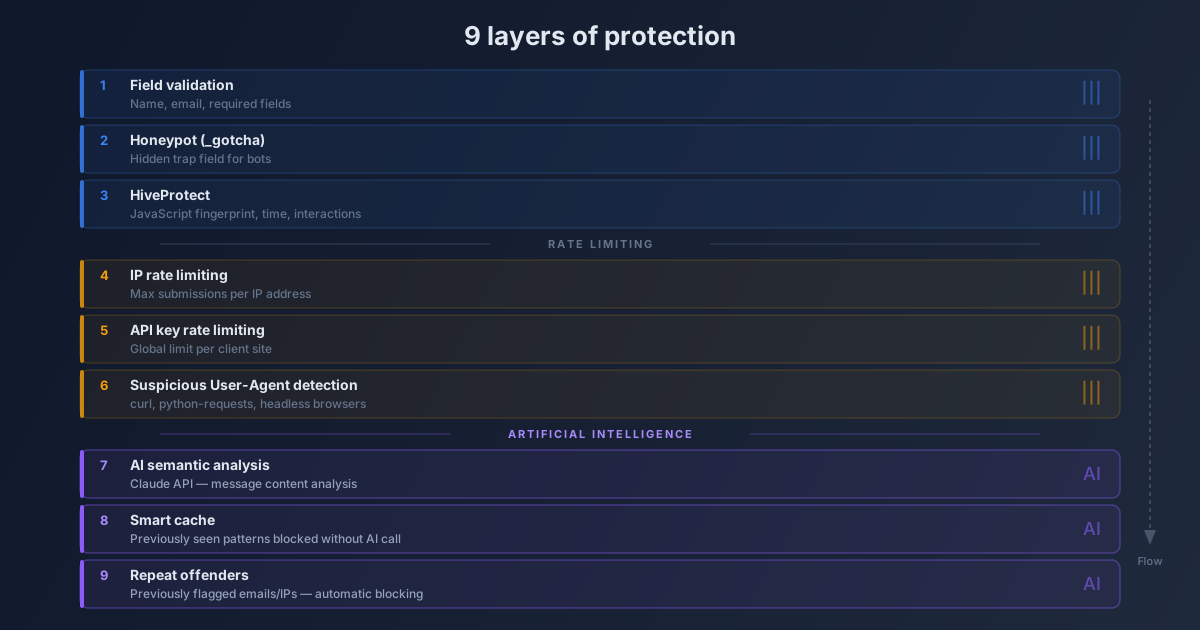
A single wall isn’t enough. You need nine.
Imagine an office building in a business district. Would a simple lock on the front door be enough to protect the premises? No. There’s a security guard at reception, an intercom, a magnetic badge reader, surveillance cameras, a visitor log, a silent alarm, and a security team available at all times. Each layer is designed to stop what the previous one lets through.
Your contact form protection works on exactly the same principle.
A single filtering mechanism, however sophisticated, will eventually be bypassed. Bots adapt, spammers test, automated scrapers methodically explore your weak points. The only effective response is a defense-in-depth architecture: multiple independent, progressive layers that complement and reinforce each other.
That’s what Prospect Hub has built: nine protection layers active simultaneously, in a precise order, so that every lead reaching your CRM is a real human contact interested in your services. Here’s how this system works in detail.
The architecture at a glance
Before diving into each layer, here’s the complete flow that every form submission traverses:
FORM SUBMISSION
         |
         v
[1] Field validation       -----> REJECT if fields missing or malformed
         |
         v
[2] Honeypot (_gotcha)     -----> REJECT if invisible field is filled
         |
         v
[3] HiveProtect (JS fingerprint) -> REJECT if non-human behavior
         |
         v
[4] Rate limiting by IP    -----> REJECT if too many submissions from this IP
         |
         v
[5] Rate limiting by API key --> REJECT if client quota exceeded
         |
         v
[6] User-Agent detection   -----> REJECT if suspicious agent (curl, headless...)
         |
         v
[7] AI analysis - Content  -----> REJECT if spam content detected by Claude
         |
         v
[8] AI cache               -----> REJECT if pattern already known (no AI call)
         |
         v
[9] Repeat offenders       -----> REJECT if email/IP already flagged
         |
         v
      LEAD ACCEPTED
If a layer rejects the submission, the following ones are not executed. This principle of progressive stopping is fundamental: it avoids calling artificial intelligence for trivial spam that a basic rule can stop in milliseconds.
Layer 1: Field validation
What it does
The first check is also the most immediate: ensuring the submission contains the minimum information needed to create a valid lead.
Prospect Hub requires at least one identifier to be present: a name, an email address, or both. If fields are absent, empty, or if the email address doesn’t follow a recognizable format, the submission is immediately rejected with an explicit error message.
Why it’s necessary
This layer stops two categories of unwanted submissions. First, technical errors: a misconfigured form, a field renamed on the client side, a faulty integration. Second, brute injection attacks: some bots send malformed requests to test server robustness, without even bothering to simulate a correct form.
Input validation is your first line of defense. Fast, free, unambiguous.
Layer 2: The honeypot (_gotcha)
What it does
A hidden field, invisible to the human eye, is present in every form integrating Prospect Hub. It’s called _gotcha. A real user will never see it and never fill it in. An automated bot, on the other hand, scans all form fields and mechanically fills every input it finds, including those hidden by CSS.
If the _gotcha field contains any value at the time of submission, Prospect Hub immediately rejects the request.
Why it’s necessary
The honeypot is an old technique but devastatingly effective against first-generation bots. It requires no interaction from the user — unlike CAPTCHA — and adds zero friction to the contact journey. It’s completely transparent for your legitimate visitors.
Want to learn more about the differences between honeypot, CAPTCHA, and AI? Check out our complete anti-bot comparison.
Layer 3: HiveProtect — behavioral fingerprinting
What it does
HiveProtect is a client-side behavioral analysis system. A discrete JavaScript script observes how the form is filled: the time elapsed between opening the page and submitting, keyboard and mouse interactions, movements between fields, typing speed.
This data is compiled into a behavioral fingerprint sent with the submission. A human filling out a form produces a recognizable signature: they hesitate, correct, move the cursor, take time to read the fields. A bot fills everything in milliseconds, with mechanical precision and zero hesitation.
Why it’s necessary
Next-generation bots can bypass the honeypot. Some are programmed to ignore hidden fields. HiveProtect adds a dimension that simple automations cannot easily simulate: human behavior in all its complexity and imperfection.
Layer 4: Rate limiting by IP address
What it does
Every IP address that submits a form is tracked. If the number of submissions from the same IP exceeds a defined threshold within a sliding time window, new submissions are rejected until the window expires.
Why it’s necessary
A human user doesn’t submit ten contact forms in ten seconds from the same address. This behavior is characteristic of a bot testing your endpoint or a mass-fill attack. IP rate limiting stops these attempts without needing to analyze message content.
This layer also protects your AI call quota: without it, a sustained attack could consume thousands of Claude tokens in minutes.
Layer 5: Rate limiting by API key
What it does
Each API key associated with a Prospect Hub account has its own submission counter. If an integrated site sends an unusually high volume of leads over a short period, new submissions are temporarily throttled.
Why it’s necessary
This layer protects both the client and the platform. It prevents a vulnerability on a public form (or a targeted attack on a specific site) from generating thousands of fake leads in a single CRM account. It also ensures fair service quality across all platform users.
Layer 6: Suspicious User-Agent detection
What it does
Every HTTP request includes a User-Agent header identifying the client making the request. Modern browsers send detailed strings including their name, version, and operating system. Bots and automated scripts, however, often use generic agents or betray their nature through their signature.
Prospect Hub maintains a list of agents known to be associated with automated submissions: curl, python-requests, Wget, headless browsers like Puppeteer or Playwright in undisguised mode, generic HTTP libraries. If the submission comes from such an agent, it’s rejected outright.
Why it’s necessary
A contact form is not a public API. Nobody should be calling it from a shell script or Python library in production. This layer quickly eliminates a large portion of unsophisticated automated submissions, which nonetheless represent a significant share of total spam volume.
Layer 7: AI analysis — semantic content detection
What it does
This is where artificial intelligence comes into play. Submissions that pass the first six layers are sent to Anthropic’s Claude API for semantic content analysis.
The model analyzes the message, name, email address, and other submitted fields to detect characteristics of linguistic spam: aggressive commercial promises, links to external sites, generic phrasing typical of mass campaigns, inconsistencies between fields, text that’s obviously auto-generated.
If the AI concludes the submission is spam, it’s rejected with the label ai_spam. This label appears on the lead in your dashboard, letting you know exactly which layer intercepted it.
Why it’s necessary
The previous layers rely on deterministic rules: a missing field, an overly active IP, a suspicious agent. They cannot evaluate message semantics. A human can very well send a spam message from a legitimate IP, with a real browser, after waiting a few seconds. Only content analysis can detect this type of human or semi-automated spam.
To learn more about this topic, read our article on AI spam detection in forms.
Layer 8: AI cache — known patterns
What it does
Each AI analysis generates a result that is cached. If a submission matches the same characteristics as a pattern already analyzed and classified as spam, it’s rejected directly from the cache, without a new Claude API call.
The associated label is ai_cached_spam: you know the submission matches a known spam pattern, blocked preemptively.
Why it’s necessary
Claude API calls have a cost in tokens and processing time. Without caching, every suspicious submission would generate an AI request. Yet spammers often use the same message templates: the same slightly reformulated text, the same type of promotional content, the same sentence structures.
The cache lets you benefit from the intelligence of the initial analysis without paying the cost for each repetition. It’s both faster and cheaper.
Prospect Hub displays the number of Claude tokens consumed in real time in your interface, giving you complete visibility on the actual cost of AI protection.
Layer 9: Repeat offenders — long-term memory
What it does
The last layer relies on history. If an email address or IP address has previously been flagged as spam — whether through AI analysis or manual reporting — any new submission from that source is automatically blocked.
The associated label is ai_repeat_offender. The submission isn’t analyzed again: the history is enough.
Why it’s necessary
Some spammers or bots persist. They test, adjust their content, try again. Without memory, each attempt would be treated as a new submission, potentially consuming AI resources. With this layer, a source identified as malicious is systematically blocked, regardless of the sophistication of the new message.
This layer also protects against fake leads that cost time and money: a repeat offender can no longer pollute your pipeline.
The progressive principle: conserving resources
The order of the nine layers is not arbitrary. It follows a logic of increasing cost:
- Layers 1 through 6 are nearly instantaneous and cost nothing in external resources.
- Layer 7 involves a call to the Anthropic API (token cost).
- Layer 8 avoids this call if the pattern is already known.
- Layer 9 avoids this call if the source is already flagged.
In practice, the vast majority of spam is intercepted before even reaching AI analysis. Trivial bots fall on the honeypot or rate limiting. Automated scripts are filtered by User-Agent. Only ambiguous cases — suspicious human submissions, sophisticated spam — make it to the AI.
This design ensures that token costs remain proportional to the actual complexity of threats, not their raw volume.
Visual badges in your dashboard
In the Prospect Hub interface, each lead carries a badge indicating its filtering status. At a glance, you can see:
- Which leads were accepted without alerts.
- Which leads were flagged as suspicious, and by which layer.
- Among filtered leads, those marked
ai_spam,ai_cached_spam, orai_repeat_offender.
These badges let you not only understand the nature of the spam you receive, but also calibrate your confidence in accepted leads. A lead that passed all nine layers without a single signal is a particularly qualified contact.
Lead scoring becomes especially meaningful when based on this filtering data: a clean lead is worth more than an ambiguous one.
How to activate AI protection
AI protection can be activated from your Prospect Hub account settings.
Step 1: Access security settings
In your dashboard, go to Settings, then the Security and Filtering tab.
Step 2: Enable AI analysis per API key
Each API key can have AI analysis enabled or disabled independently. This lets you activate it on forms exposed to high public traffic, while leaving it disabled on internal integrations with low spam exposure.
Step 3: Enter your Anthropic key
AI analysis requires a valid Anthropic API key, entered in the Profile section of your account. Prospect Hub uses this key to make Claude calls on your behalf. You retain full control over your consumption and costs.
Layers 1 through 6 (validation, honeypot, HiveProtect, rate limiting, User-Agent) are active for all accounts, with no configuration needed.
Conclusion: layered security, a philosophy
Prospect Hub’s anti-spam protection is designed to resemble what nature does against threats: multiple redundant, independent mechanisms that complement each other. If one fails or is bypassed, the next ones take over.
The result is a reliable lead pipeline where you can invest your time and energy knowing that every contact represents a real business opportunity.
To connect your forms and benefit from these nine layers of protection, check out our guide to integrating your web forms with Prospect Hub.
Ready to protect your pipeline? Create your Prospect Hub account and activate anti-spam protection today.
Key takeaways:
- Nine progressive layers filter every submission before it reaches your CRM.
- The order is designed to save AI calls: only ambiguous submissions trigger them.
- Three specific labels (
ai_spam,ai_cached_spam,ai_repeat_offender) precisely identify the detection type. - Dashboard badges give you complete visibility into the quality of your leads.
- AI analysis is activated per API key, using your own Anthropic key.