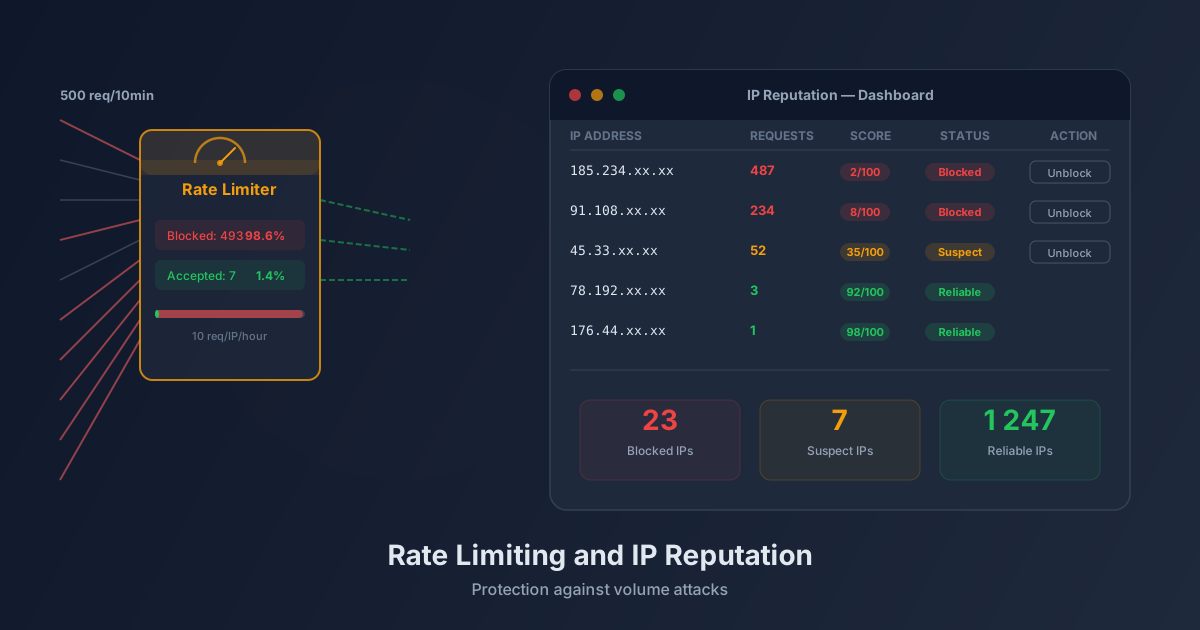
Scenario: 500 submissions in ten minutes
It’s 2:37 PM. Your contact form receives a first submission. Then another. Then ten, then a hundred. By 2:47 PM, your dashboard shows 500 new leads — all with invalid data, all from the same IP address range, all generated by a script running in a loop.
This is a volume attack. It’s not trying to steal your data. It’s trying to saturate your database, exhaust your quotas, and drown your real leads under a flood of fakes. Without protection, you won’t realize it until the damage is done.
This type of attack is commonplace. It requires no special skills: a twenty-line Python script is enough. The question isn’t if your form will be targeted, but when.
This article explains how Prospect Hub addresses this problem, layer by layer — without blocking your real clients.
Rate limiting: the bouncer at the door
Imagine a bouncer at a nightclub. They don’t just look at whether you seem suspicious. They also watch the frequency: if the same person tries to enter twenty times in five minutes, something’s off, regardless of their appearance.
Rate limiting works on exactly this logic.
Limiting by IP address
Each IP address has a quota of allowed submissions over a sliding time window. In practice: an IP address cannot submit more than N forms per hour. If it exceeds this threshold, subsequent requests are rejected — or flagged as suspicious — for a set duration.
This approach covers the vast majority of volume attacks, because simple scripts use a single IP address or a narrow range. A human, even a very fast one, will never submit a form twenty times per hour.
Limiting by API key
IP limiting protects against external abuse. API key limiting protects against internal abuse — or more precisely, against key compromise.
Each client site has its own API key (pk_xxxxx). This key is associated with a global quota. If it’s accidentally exposed in a public source code repository or used abusively, the key will be throttled before the impact becomes critical. Other clients aren’t affected; your real leads continue arriving normally.
These two levels work in parallel. An attacker who bypasses the IP limit by using multiple addresses would still hit the API key limit.
The IP reputation dashboard
Rate limiting is an automatic barrier. But every automatic barrier generates false positives. A salesperson testing their own form repeatedly, a monitoring tool checking form availability, a corporate network where multiple employees share the same outbound IP: all legitimate situations that can trigger alerts.
That’s why Prospect Hub includes an IP reputation dashboard accessible from the admin interface.
What you see
The view lists IP addresses that triggered alerts, with each showing:
- The number of submissions over the time window
- The calculated reputation score (combination of frequency, User-Agent, HiveProtect behavior)
- Current status: monitored, temporarily blocked, manually blocked
The “unblock” button
If you recognize a legitimate IP — a partner, your own team, a testing tool — you can unblock it in one click. The score is reset, and future submissions from that address are accepted normally again.
This action is logged. You know who unblocked what, and when.
HiveProtect: the invisible fingerprint
Rate limiting analyzes volumes. HiveProtect analyzes behaviors.
When a user loads your form, a JavaScript script discreetly measures several signals:
Fill time. A human filling a form rarely takes less than five seconds. They read labels, type their name, move between fields. A bot that injects values directly into the DOM typically takes less than one second — often milliseconds.
Mouse and keyboard interactions. A human moves their mouse, clicks, makes mistakes, corrects them. A bot generates no mouse movement, no intermediate events. HiveProtect measures the presence or absence of these events.
Focus sequence. A human navigates fields in order, sometimes goes back. A bot often fills all fields simultaneously, without respecting the form’s natural order.
This data doesn’t leave the browser in readable form. It generates a compressed fingerprint sent with the submission. Server-side, this fingerprint is decoded and contributes to the lead’s final score.
If the fingerprint indicates non-human behavior, the lead is flagged as suspicious — but not necessarily rejected. You remain in control of the decision.
Suspicious User-Agent detection
A User-Agent is the identifier the HTTP client sends to the server to introduce itself. Modern browsers send long, precise strings (Mozilla/5.0 (Windows NT 10.0; Win64; x64) AppleWebKit/537.36...). Attack scripts, however, often send revealing User-Agents.
Prospect Hub automatically blocks or penalizes submissions from:
curlandwget(command-line tools)python-requests,python-urllib(Python HTTP libraries)axios,node-fetchwithout an identified browser context- Empty strings or generic strings (
bot,spider,scraper) - Detectable headless browsers (
HeadlessChrome,PhantomJS)
A real browser never sends these User-Agents. Detection is fast, inexpensive, and filters a significant portion of automated attacks.
Summary table: which layer blocks what
| Attack type | Intervening layer |
|---|---|
| Simple script from a single IP | IP rate limiting |
| Distributed script with compromised API key | API key rate limiting |
| Bot without browser User-Agent | User-Agent detection |
| Fast bot with falsified User-Agent | HiveProtect (fill time < 1s) |
| Sophisticated bot with artificial delay | HiveProtect (absence of mouse interactions) |
| Form submitted outside a browser | HiveProtect (missing fingerprint) + User-Agent |
| Low but persistent volume over time | IP reputation (cumulation over sliding window) |
No single layer is infallible alone. It’s their combination that makes attacks economically unprofitable for the attacker.
Visual indicators in the leads dashboard
Each lead displayed in your pipeline carries confidence indicators. A clean lead shows nothing special. A suspicious lead displays colored badges telling you what was detected:
- Suspicious IP: the IP address had a degraded reputation score at submission time
- Bot behavior: the HiveProtect fingerprint indicates non-human filling
- Invalid User-Agent: the request came from a non-browser HTTP client
- Rate limit reached: the submission was accepted despite a quota breach (degraded mode)
Clicking on a lead gives you the complete detail: each signal’s score, received User-Agent value, measured fill time, IP status at submission time. Nothing is opaque.
This transparency is essential for calibrating your confidence in incoming leads and making informed decisions — particularly about which leads deserve priority treatment versus those requiring manual verification.
Going further
Rate limiting and IP reputation are two of the nine protection layers Prospect Hub deploys on every form. To understand the complete system, read our article on the 9 layers of anti-spam protection.
For a technical comparison between honeypot, CAPTCHA, and behavioral protection, check our anti-bot comparison. And if you haven’t yet connected your form to Prospect Hub, the integration guide walks you through step by step.
Finally, to understand why classic protections are no longer sufficient against modern AI-powered bots, our article on form spam and AI addresses the fundamental issue.
Want to test the protection on your own forms?
Prospect Hub is available with no commitment. Connect your first form in under five minutes and watch in real time what your form actually receives — and what gets filtered before reaching your pipeline.