“A CRM? That’s not for me, that’s for big corporations”
We hear this phrase every week. The plumber who jots contacts in a notebook. The electrician who keeps quotes in a Gmail folder. The carpenter who remembers “off the top of his head” that he needs to call back that client.
When you mention CRM to them, the reaction is immediate: “No way, it’s an overcomplicated mess, it’s made for Salesforce salespeople with 200 dashboards.”
And they’re not entirely wrong. Most CRMs on the market are overcomplicated messes.
Only 12% of tradespeople and small businesses with under 10 employees use a CRM. The rest manage their contacts with Excel files, paper notebooks, or simply… from memory.
The problem isn’t that these professionals don’t need a CRM. It’s that they’re being offered the wrong tools.
The real problem: tools designed for multinationals
Salesforce, HubSpot, Pipedrive… why they don’t work for small businesses
Take a tradesperson plumber. Their day:
- 7am: head to a job site
- 12pm: break, return 3 missed calls
- 2pm: new job site
- 6pm: back home, needs to prepare quotes
- 8pm: tries to remember who they were supposed to call back
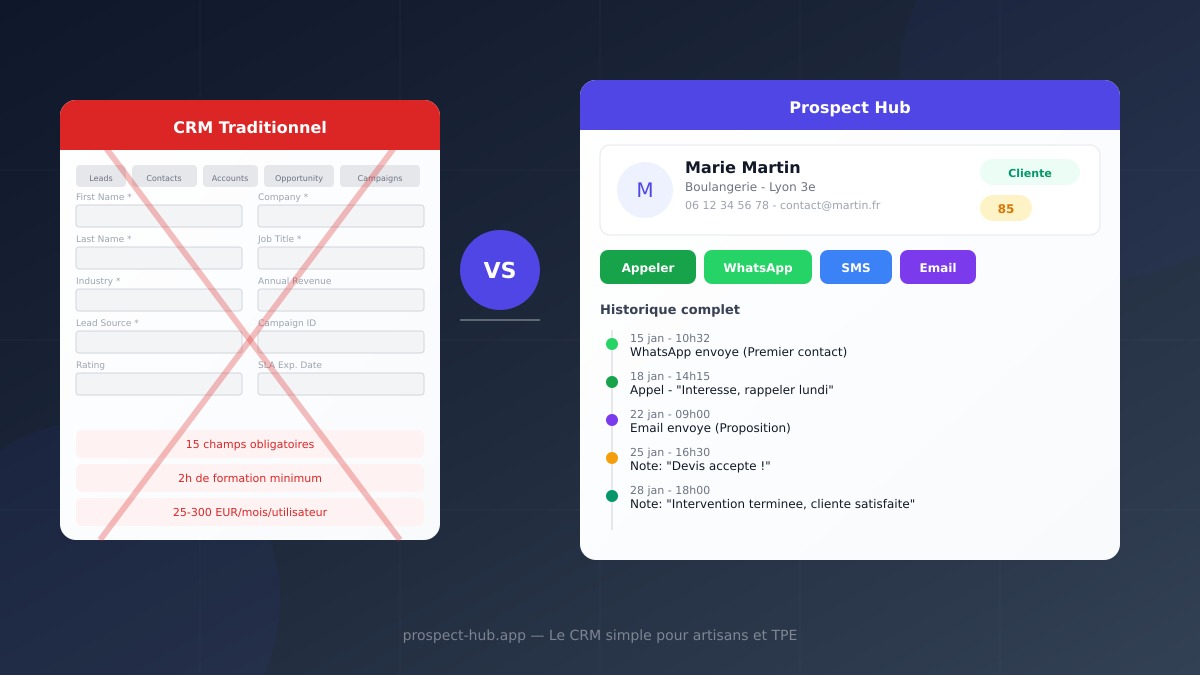
Now imagine asking them to use Salesforce. They need to:
- Log into a dashboard with 47 tabs
- Create an “opportunity” in a “pipeline”
- Fill in 15 required fields
- Configure “workflows” and “automations”
- Understand the difference between a “Lead”, a “Contact”, an “Account”, and an “Opportunity”
Predictable result? They try for 2 days, give up, and go back to their notebook.
What tradespeople and small businesses actually want
After talking with hundreds of professionals, the needs are always the same:
- Know who I contacted and when
- Not forget to call back a prospect
- Quickly find a number or address
- See where things stand with each client (prospect, in progress, completed)
- Keep a record of what was done for each client
That’s it. No “AI-powered predictive scoring.” No “multi-touch funnel.” No “cross-channel engagement KPIs.” Just a simple place to never forget anything and always find everything.
Prospect Hub: the CRM that doesn’t look like a CRM
The philosophy: if it’s complicated, it’s failed
Prospect Hub was designed with one obsession: a tradesperson must be able to use it between job sites, on their phone, in 30 seconds. No training. No 2-hour tutorial. No $500/day consultant to configure the tool.
You open the app. You see your prospects. You click. You act. That’s it.
The complete journey: from first contact to loyal client
Here’s how a prospect evolves in Prospect Hub — and why it’s so powerful despite its simplicity:
Stage 1 — The Prospect (new contact)
You find an interesting contact on Google Maps, a trade show, or word of mouth. In two clicks, they’re in your database. Name, phone, email, address, category — everything’s there.
Stage 2 — First contact
Directly from their record, you send them a WhatsApp or SMS with a personalized template. “Hello Marie, I’m Chris from WebPulse…” The message is sent. The interaction is automatically logged.
Stage 3 — The hot lead (they responded)
Marie responded! You change her status with a single click. She moves from “new” to “contacted,” then “interested.” Her score goes up. You add a note: “Meeting planned Thursday 2pm.”
Stage 4 — The client (they signed)
Marie said yes. One click, she moves to “converted.” But it’s not over — this is where real tracking begins.
Stage 5 — Client tracking (everything is logged)
You did a job for Marie? Add a note. You sent her the invoice by email? The interaction is logged. She calls back 3 months later for another need? The full history is there: what you did, when, through which channel.
Every call, every WhatsApp, every email, every note is chronologically recorded in the client’s record. Six months later, you know exactly what happened — without digging through emails or your memory.
What Prospect Hub does NOT have (and that’s by design)
| What Prospect Hub doesn’t have | Why it’s better without |
|---|---|
| 47 configuration tabs | You open the app, it’s ready |
| 15 required fields | Only name is required |
| Complex workflows | You change a status in 1 click |
| 30-page reports | A visual dashboard with the essentials |
| 2-hour training | Onboarding in 2 minutes |
| $300/month subscription | Free up to 300 leads |
The difference in daily life: 3 real stories
Marc, plumber in Bordeaux
Before Prospect Hub: Marc used to write numbers on scraps of paper. He forgot to call back one client in two. He lost ongoing quotes. His wife told him “you should use some computer thing” — he’d respond “it’s too complicated for me.”
With Prospect Hub: Marc imported his 60 contacts in 5 minutes from an Excel file. Now, every morning on his phone, he sees prospects to follow up. He sends a WhatsApp with a template in one second. When a client calls back, he opens the record and sees the full history: first contact, quote sent, job completed.
His verdict: “It’s like a smart contact book. Even simpler.”
Sophie, freelance graphic designer
Before Prospect Hub: Sophie managed her prospects in a Google Sheets spreadsheet with 12 columns and colors everywhere. She spent more time updating her file than prospecting. When a prospect recontacted her after 3 months, she couldn’t remember their conversation.
With Prospect Hub: Sophie sees her pipeline at a glance. Her prospects are sorted by status: new, contacted, interested, converted. She filters by category, by city. When someone recontacts her, she opens the record: everything’s there. The first email, her follow-up, the note “interested but not before March.”
Her verdict: “I finally have client tracking that doesn’t take more time than the work itself.”
Laurent, electrician with 2 employees
Before Prospect Hub: Laurent had tried HubSpot. Too many menus, too many options. Then an Excel spreadsheet. Too many rows, impossible to share with his technician. Result: everyone managed contacts separately.
With Prospect Hub: Laurent and his technician access the same lead database. When Laurent contacts a prospect, his technician sees it. When the technician does a job at a client’s, he adds a note visible to Laurent. No more “did you call back the client on Victor Hugo street?” — it’s all in the record.
His verdict: “It’s the first time we’ve managed to share contacts without it being a mess.”
Simple CRM doesn’t mean limited CRM
Some think “simple” means “basic.” That’s wrong. Prospect Hub is simple to use, but complete in what it offers:
What you can do
- Bulk import from Google Maps, CSV files, or the SIRENE API
- Contact in 1 click via WhatsApp, SMS, or email with personalized templates
- Track every interaction: calls, messages, notes, status changes
- Filter and sort by status, category, city, rating, email/phone presence
- Score your leads with an automatic rating system
- View on a map all your geolocated prospects
- Act in bulk: select 50 leads and send them a personalized WhatsApp
- Integrate forms: every request received on your site automatically creates a lead
Complete client tracking at a glance
When you open a contact’s record, you see everything:
- Complete contact details (phone, email, address, website)
- Current pipeline status
- Scoring grade (0 to 100)
- Complete history of all interactions:
- WhatsApp sent Jan 15 at 10:32am (template “First contact”)
- Call on Jan 18 at 2:15pm
- Note: “Interested, call back after Jan 20”
- Email sent Jan 22 (template “Proposal”)
- Note: “Quote accepted, job scheduled for Jan 28”
- Note: “Job completed, client satisfied”
Six months later, this client calls you back. You open their record: you know everything. No need to dig through Gmail, WhatsApp, or your texts. Everything is in one place.
The question to ask yourself
Don’t ask “do I need a CRM?” Instead ask:
- How many prospects did I forget to call back this month?
- How much time do I waste looking for a number or email?
- Do I know exactly where things stand with each client?
- Does my team have access to the same information as me?
If you hesitated on even one of these questions, you need a CRM. Not an overcomplicated mess. A simple tool that gets the job done.
A good CRM doesn’t ask you to change how you work. It adapts to you. That’s exactly Prospect Hub’s philosophy.
Start for free, no commitment
Prospect Hub is free up to 300 leads. No 14-day trial that expires. No credit card required. No features locked behind a paywall.
You create your account in 30 seconds, import your contacts, and start working. If in 6 months your business explodes and you exceed 300 leads, you can upgrade to a higher plan. In the meantime, you have a complete tool with no feature limitations.
Stop losing clients because you forgot to call them back. Create your Prospect Hub account and take control of your prospecting — in 2 minutes, not 2 days.