The copy-paste nightmare
You have 30 prospects to contact today. For each one, it’s the same routine: open WhatsApp Web, find the number, type the message, replace the name, city, business type… Then do it again for SMS. And again for email.
Result? Three hours of copy-pasting. Name mix-ups. A message sent to the wrong person. And above all, a colossal waste of time that could be spent on what truly matters: closing deals.
A salesperson spends an average of 21% of their time writing messages. That’s more than one day per week lost to repetitive tasks.
The good news? That wasted time is over. Prospect Hub now includes built-in WhatsApp, SMS, and Email messaging directly from your prospect records — with personalized templates that do the work for you.
How it works: one click, one perfect message
From a prospect’s record
When you open a lead’s record in Prospect Hub, you see three direct action buttons:
- WhatsApp — Opens your WhatsApp conversation with the message pre-filled
- SMS — Opens your SMS app with the message ready to send
- Email — Opens your email client with the subject and body already written
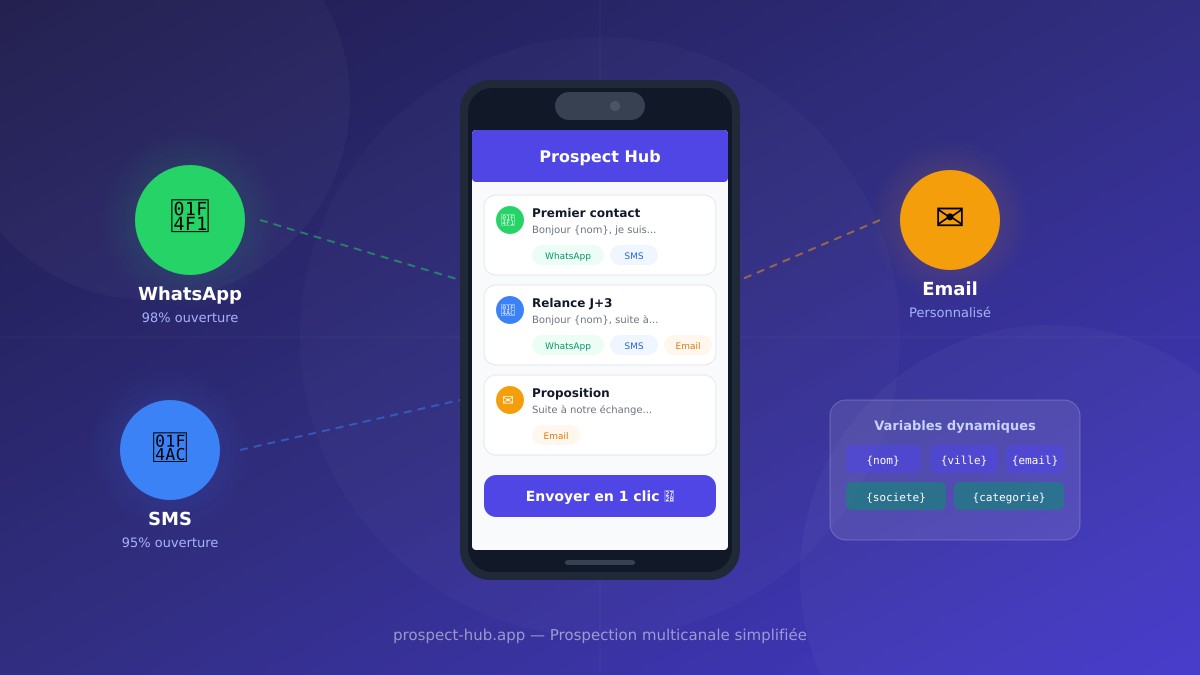
Each button displays a dropdown menu with your templates. Click the template you want, and you’re done: the message is automatically personalized with the prospect’s data.
What happens behind the scenes
When you select a template, Prospect Hub performs three actions in a fraction of a second:
- Variable replacement — The prospect’s name, city, and category are injected into the message
- Phone formatting — The number is converted to international format (e.g., 06 12 34 56 78 becomes +33612345678)
- Channel opening — WhatsApp, SMS, or your email client opens with the message ready
All you have to do is press Send. The message is already perfect.
Templates: your secret weapon
Models you create once, use a thousand times
Templates are reusable message models. You create them once in Settings > Message Templates, and they’re available everywhere in the application.
Each template contains:
| Element | Description |
|---|---|
| Name | A clear name for easy retrieval (e.g., “First contact”, “Follow-up D+3”) |
| Channel | WhatsApp, SMS, Email, or a combination |
| Content | Message text with dynamic variables |
Dynamic variables
This is where the magic happens. Instead of writing “Hello John Smith”, you write “Hello {nom}”. When sending, Prospect Hub automatically replaces the variable with the prospect’s actual data.
Available variables:
| Variable | Replaced by | Example |
|---|---|---|
{nom} | Prospect’s name | John Smith |
{categorie} | Category/trade | Bakery |
{ville} | City | London |
{adresse} | Full address | 12 Baker Street |
{telephone} | Phone number | 06 12 34 56 78 |
{email} | Email address | contact@example.com |
{prenom_utilisateur} | Your first name (from your profile) | Chris |
{societe} | Your company (from your profile) | WebPulse |
Concrete example
Here’s a first contact template:
Hello {nom},

I'm {prenom_utilisateur} from {societe}. I'm reaching out because
we offer services that could benefit your business in {ville}.

Would you be available to discuss this?

Best regards
For a prospect named “Marie Martin” in “Lyon”, the sent message becomes:
Hello Marie Martin,

I'm Chris from WebPulse. I'm reaching out because we offer
services that could benefit your business in Lyon.

Would you be available to discuss this?

Best regards
Zero copy-paste. Zero errors. Zero wasted time.
Real-time preview
When you create or edit a template, a real-time preview shows you exactly what the final message will look like. Variables are replaced with sample data so you can verify formatting before saving.
5 channels to reach each prospect in the right place
Not all prospects are contacted the same way. The restaurant owner with their phone in their pocket prefers WhatsApp. The accountant behind their desk reads emails. The plumber on a job responds better to SMS.
Prospect Hub lets you choose the right channel for each template:
| Channel | Ideal for | Average open rate |
|---|---|---|
| Tradespeople, shopkeepers, informal contacts | 98% | |
| SMS | Short messages, reminders, confirmations | 95% |
| Detailed proposals, attached documents | 20-30% | |
| WhatsApp + SMS | Maximizing contact chances | — |
| All channels | Universal templates, adaptable | — |
WhatsApp has a 98% open rate compared to 20% for email. For a first contact, the choice is quickly made.
A single template can be assigned to multiple channels. Your “First contact” message can be used via WhatsApp, SMS, or email — it will appear in all three dropdown menus.
Bulk actions: prospect at scale
Contact 50 prospects in 2 minutes
Individual prospecting is good. Bulk prospecting is better.
From the dashboard, you can:
- Check the prospects you want to contact
- Click the WhatsApp or SMS button
- Choose the template to use
- Send — Prospect Hub opens a personalized message for each prospect
The system shows a preview with the first selected lead’s data, so you can verify the output before sending. It also tells you how many prospects have a valid phone number among your selection.
Filter before sending
Prospect Hub’s dashboard lets you filter your leads by status, category, city, rating, or the presence of an email or phone number. Combine these filters to precisely target your audience before sending.
Example workflow:
- Filter by category “Restaurant” + city “Paris”
- Check the 20 displayed leads
- Click “WhatsApp (20)”
- Select the “Restaurant proposal” template
- Send 20 personalized messages
Each message is unique — the name, city, and address of each prospect are different. But you haven’t typed a single character.
Traceability: every message is logged
With every message sent (WhatsApp, SMS, or email), Prospect Hub automatically records the interaction in the lead’s history. You know exactly:
- When the message was sent
- On which channel (WhatsApp, SMS, email)
- Which template was used
- The exact content of the sent message
Never again the question “Did I already contact this prospect?” The complete history is right there, before your eyes, directly in the lead record.
This traceability is essential for organizing follow-ups: you can see at a glance which prospects haven’t been contacted yet and which ones are due for a follow-up.
Concrete benefits for your prospecting
| Benefit | Before | With Prospect Hub |
|---|---|---|
| Time per message | 3 minutes (copy, paste, correct) | 5 seconds (one click) |
| Personalization | Frequent mistakes, name mix-ups | 100% automatic, zero errors |
| Consistency | Every message is different | Same quality for every prospect |
| Tracking | ”When did I contact them again?” | Complete history with date and content |
| Volume | 10-15 messages per day | 50+ messages in minutes |
| Multichannel | Juggling 3 apps | Everything from one interface |
3 concrete use cases
The tradesperson prospecting local businesses
Marc is an electrician in Bordeaux. He imported 80 businesses from his neighborhood via Google Maps into Prospect Hub. Every morning, he selects 10 leads, picks his “Maintenance proposal” template, and sends 10 personalized WhatsApp messages in under a minute. In one month, he landed 4 new maintenance contracts.
The freelancer following up on warm prospects
Sophie is a graphic designer. She has 40 prospects “on hold” in her pipeline. With the “Follow-up D+7” template, she selects all leads contacted more than a week ago and sends a bulk follow-up by email. Her response rate went from 5% to 18% thanks to personalized messages sent at the right time.
The web agency contacting 50 restaurants per day
The WebPulse agency creates websites for restaurateurs. Every day, a sales rep selects 50 “Restaurant” leads in the dashboard, sends a WhatsApp with the “Site demo” template, then schedules an SMS follow-up for two days later. Templates guarantee a professional, consistent message regardless of which rep sends it.
How to get started in 2 minutes
You don’t need any technical setup. Here are the three steps to send your first templated message:
Step 1: Create your account (free)
Head to prospect-hub.app and create your account. It’s free, no credit card required.
Step 2: Your first templates are already there
Prospect Hub automatically creates 4 default templates upon registration:
- First contact — To open the conversation
- Service proposal — To present your offer
- Follow-up — To reconnect with a silent prospect
- Meeting request — To schedule a meeting
You can use them as-is or customize them from Settings > Message Templates.
Step 3: Import your prospects and send
Import your leads (Google Maps, CSV file, or manual creation), open a record, and click WhatsApp. Choose a template. It’s sent.
Multichannel prospecting has never been simpler. No more copy-pasting, no more forgotten follow-ups, no more generic messages. Every prospect receives a personalized message, on the right channel, in one click.
Create your free account on Prospect Hub and send your first message in under 2 minutes.